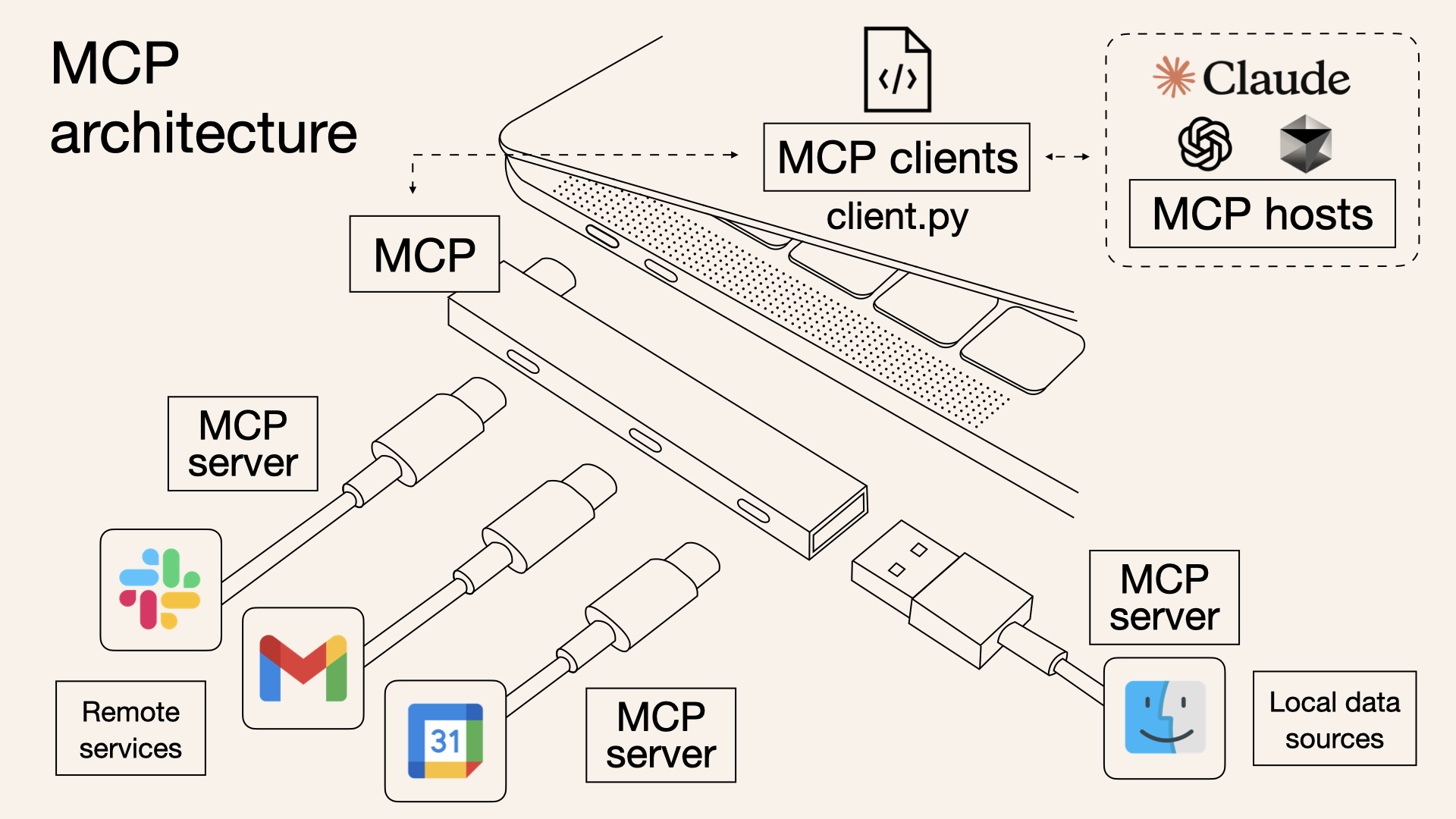
Would you like to connect your tools and data directly with language models like Claude? The Model Context Protocol (MCP) is an emerging solution that allows developers to integrate applications and data with language models in a standardized and efficient way.
🤖 What is the Model Context Protocol (MCP)?
MCP is an open protocol developed by Anthropic that standardizes the way applications provide context to language models (LLMs). Think of MCP as a USB-C port for artificial intelligence applications, providing a uniform way to connect language models with various data sources and tools.
With MCP, you can allow a language model to interact directly with your file system, databases, APIs and more, without the need for human interfaces such as buttons or search boxes.
✅ Advantages of MCP
- Open standard: Makes it easier to integrate language models with various applications and data.
- Flexibility: Allows developers to build custom tools that language models can use.
- Efficiency: Reduces the need for intermediary interfaces, enabling direct communication between models and applications.
- Active community: There is a growing community of developers contributing implementations and examples.
⚠️ Considerations and challenges
- Security: When allowing language models to interact directly with systems and data, it is crucial to implement appropriate security measures.
- Permission management: It is necessary to clearly define which actions the language model can perform.
- Protocol maturity: Although MCP is gaining traction, it is still under active development and may undergo changes.
🧪 Basic example: Creating an MCP server in Go
Below is a simple example of how to create an MCP server in Go using the mcp-go library:
package main

import (
    "context"
    "fmt"
    "log"

    "github.com/mark3labs/mcp-go/mcp"
    "github.com/mark3labs/mcp-go/server"
)

func main() {
    s := server.New()

    // Define a simple tool that responds with "Hello, world"
    tool := mcp.Tool{
        Name:        "greet",
        Description: "Returns a greeting",
        Parameters:  map[string]mcp.ToolParameter{},
    }

    s.AddTool(tool, func(ctx context.Context, req mcp.CallToolRequest) (*mcp.CallToolResult, error) {
        return &mcp.CallToolResult{
            Content: []mcp.Content{
                mcp.NewTextContent("Hello, world!"),
            },
        }, nil
    })

    fmt.Println("MCP server running...")
    if err := s.Run(); err != nil {
        log.Fatal(err)
    }
}
This server defines a tool called “greet” that, when called by the language model, responds with “Hello, world!”.
🖥️ Integration with Claude Desktop
Claude Desktop is an application that allows language models to interact with your desktop environment. By configuring an MCP server like the one above, you can extend Claude’s capabilities so that it performs custom tasks on your system.
I hope this article has given you a clear overview of the Model Context Protocol and how you can start using it with Go and Claude Desktop. If you have any questions or want to share your experiences, feel free to comment!